


ElemCopy Pro

Instant one click copying for text, code and images.

Helps you turn any text or code into a copy ready element. Visitors no longer need to select content with the mouse. A single click copies everything to the clipboard. This improves user experience, reduces errors and makes your pages feel modern and interactive.

14 Days Money

Back Guarantee

Safe & Secure

Checkout

Free Updates

Included

Expert Support

That Cares

click

Give your visitors a faster and cleaner way to copy content.

A lightweight and powerful Elementor addon that allows visitors to copy any text, link, email, number, code block or image with a single click, creating a smooth and modern user experience for promo codes, affiliate links, contact info and more. With a simple drag and drop widget you can add fully customizable copy buttons anywhere on your Elementor pages, complete with adjustable styles, success messages and responsive design. ElemCopy Pro works on all major browsers, supports Elementor Free and Pro, requires no coding knowledge and helps eliminate user errors by providing clean and instant copy actions for every type of content.

Features

tap(2)

Instant Copy on Click

A clean and customizable button that copies any content to clipboard with one click.
password(2)

Copy Text, Links, Emails, Codes

Perfect for coupon codes, long URLs, email addresses, instructions, links and code blocks.
photo

Copy Image to Clipboard

Copy images directly into the clipboard with one click for a faster and smarter user experience.

lightning

Dynamic Tags Enabled

Supports WordPress dynamic tags so you can copy dynamic content such as user data, custom fields and generated text.

toast

Toast Notification Support

Show a modern animated toast notification confirming that the content has been copied successfully.

system-update

Fully Customizable Styles

Change button text, colors, size, alignment and icon. Make it match your layout without writing any code.

drag-and-drop

Easy to Use with Elementor

Drag and drop the ElemCopy widget anywhere. Add your content and publish. No technical setup required.

responsive

Cross Browser

Works smoothly on all major browsers and devices including mobile.

Pricing Plan

Basic

$
12
Billed Annually
  • Single Site
  • Priority Support
  • Regular Plugin Updates
  • All Core Features Included
  • Auto-Renew Subscription
Popular

Pro

$
49
Billed Annually
  • 5 Sites
  • Priority Support
  • Regular Plugin Updates
  • All Core Features Included
  • Auto-Renew Subscription

Agency

$
159
Billed Annually
  • 100 Sites
  • Priority Support
  • Regular Plugin Updates
  • All Core Features Included
  • Auto-Renew Subscription
14-Days-Money-Back-Guarantee

14 Day Money-Back Guarantee

We are committed to your satisfaction that our products will elevate your online store’s performance, backed by our 14-day money-back guarantee. Please review our Refund Policy for more details.
elemcopypro-screenshot

How It Works

  • Install the Plugin
    Go to your WordPress dashboard, navigate to Plugins > Add New > Upload Plugin, choose the ZIP file and click Install Now.
  • Activate the Plugin
    After installation, click Activate to enable the plugin on your website.
  • Add the Copy Button
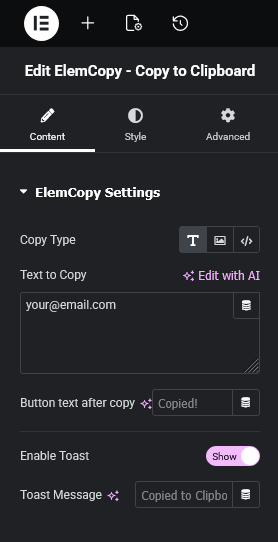
    Open the page or post with Elementor, search for “ElemCopy” in the widget panel, and drag the widget to your desired section.
  • Configure the Content
    Enter the text, code, link, email, image or HTML code that you want users to copy.
  • Customize the Button
    Adjust the button text, style, color, size, icon and alignment to match your website design.
  • Save and Publish
    Save your changes and publish the page. Your visitors can now copy content with a single click.

Bank Transfer (BACS) through Stripe

for WooCommerce

14 Days Money

Back Guarantee

Frequently Asked Questions (FAQ)

What does this plugin do?
It allows users to copy text, code, links, emails or images directly into the clipboard with a single click.
Can I copy images into the clipboard?
Yes, the plugin supports copying images as well as HTML code.
Do I need coding knowledge to use it?
No, everything works visually and requires no programming skills.
Can I customize the copy button design?
Yes, you can change the button text, colors, size, icon, alignment and style.
Does it work on all browsers?
Yes, it is designed to work on all major modern browsers including mobile browsers.
Can I use it to copy long links or promo codes?
Yes, it works perfectly with affiliate links, promo codes, emails and any other text.
Does the plugin slow down the website?
No, it is lightweight, optimized and loads very fast.
Can I display a success message after copying?
Yes, you can show a confirmation message to users after the content is copied.
Can I copy formatted code snippets?
Yes, the plugin supports copying properly formatted code blocks like HTML, CSS, JS, PHP and more.